In 2026, small and mid-sized enterprises (SMEs) face a pivotal moment for endpoint strategy. Hybrid work is now mainstream; roughly two-thirds of organisations support flexible “work-from-anywhere” setups and the cost of cybersecurity incidents keep rising. Microsoft’s latest Ignite 2025 announcements around Windows 365, Azure Virtual Desktop, and Microsoft Intune underscore that modern endpoints are key to productivity, security, and cost-efficiency in this new landscape. Below are my thoughts that highlight the strategic endpoint investments for 2026 and why they matter, with data-driven insights on productivity gains and return on investment (ROI).
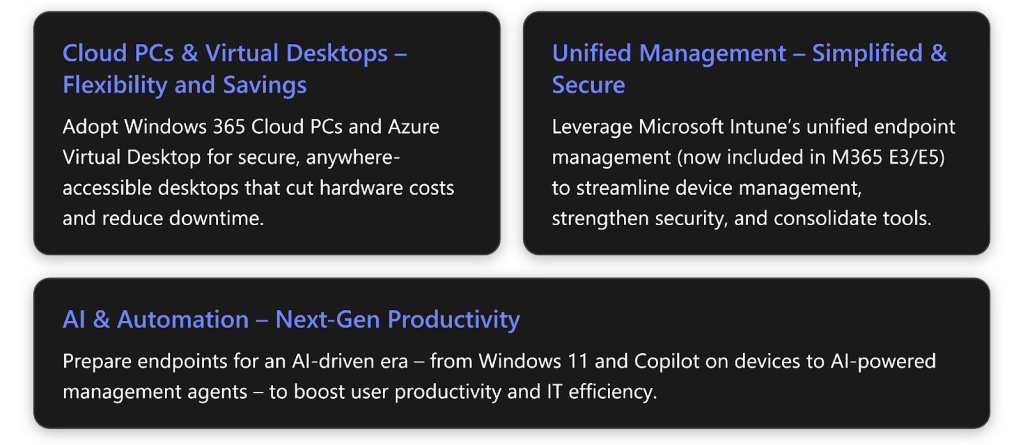
1. Embrace Cloud PCs and Virtual Desktops (Windows 365 & AVD)
Cloud-based desktops are becoming a cornerstone of modern IT strategy. Microsoft’s Windows 365 (Cloud PC) and Azure Virtual Desktop (AVD) offer different approaches to delivering Windows from the cloud, but both can dramatically improve agility and reduce costs:
- Work-from-anywhere is made easy: With a Cloud PC, users can securely access a full Windows 10/11 desktop, including apps and data from any device, anywhere. This is ideal for hybrid and remote teams, contractors, or BYOD scenarios. At Ignite 2025, Microsoft reinforced that Windows 365 is evolving into the premier platform for cloud-based desktops, even introducing “Cloud PCs for AI agents” that run automation bots beyond just human users. For SMEs, this means you can support new workflows (like RPA or AI-assisted processes) without extra infrastructure.
- Faster onboarding and scaling: Provisioning a new employee’s Cloud PC is nearly instantaneous, no need to ship a pre-imaged laptop. This simplifies onboarding/offboarding and supports business growth or seasonal scaling with minimal IT effort. One case study showed a company achieved 80% faster device provisioning by moving to cloud-managed endpoints. In practice, an IT admin can assign a Cloud PC in Intune and have a user productive within minutes, which is a game-changer for SMEs with lean IT teams.
- Lower hardware and maintenance costs: With cloud desktops, much of the compute is in the cloud. Devices no longer need to be high-end even an older PC, thin client, or personal device can serve as a simple access point. This can extend hardware refresh cycles and avoid immediate laptop purchases. In fact, a Microsoft-commissioned Forrester study found that a bring-your-own-PC program with Windows 365 saved a 2,000-employee firm ≈$1.2 M over three years by reducing the need for new corporate laptops. Additionally, you’ll spend less time on imaging, patching, and break-fix for distributed PCs since the cloud service handles much of that centrally.
- Improved security & continuity: Data and applications reside in the cloud, not on local endpoints, which reduces the risk of data loss or theft if a device is lost. All Cloud PCs are managed under your policies (via Intune), ensuring compliance. New features like Windows 365 Reserve provide on-demand “backup” Cloud PCs in case a user’s primary device is lost or ransomware strikes – keeping workers online during crises. Similarly, hotpatching for Windows 365 (now GA) allows monthly security updates to apply without rebooting, meaning users experience near-zero downtime for patching. These innovations keep employees working with fewer interruptions while maintaining security.
- Azure Virtual Desktop for flexibility: Azure Virtual Desktop remains crucial for certain SME scenarios especially when you need pooled or scalable virtual desktops. AVD lets you run multi-user sessions and pay by consumption, which can be cost-efficient for users who only need a desktop occasionally or for scaling up during peak times. Microsoft continues to invest in AVD as the go-to for flexible VDI: at Ignite, they announced AVD can even run on hybrid/on-prem infrastructure (via Azure Arc), enabling scenarios like keeping some desktops in-country or on your own servers for compliance. For SMEs in regulated industries or with specific latency needs, this hybrid capability offers new deployment options. In general, Windows 365 and AVD now have a seamless migration path, a new API can convert AVD host pools or existing Azure VMs into Cloud PCs so you can gradually transition workloads between the two platforms and choose what fits best.
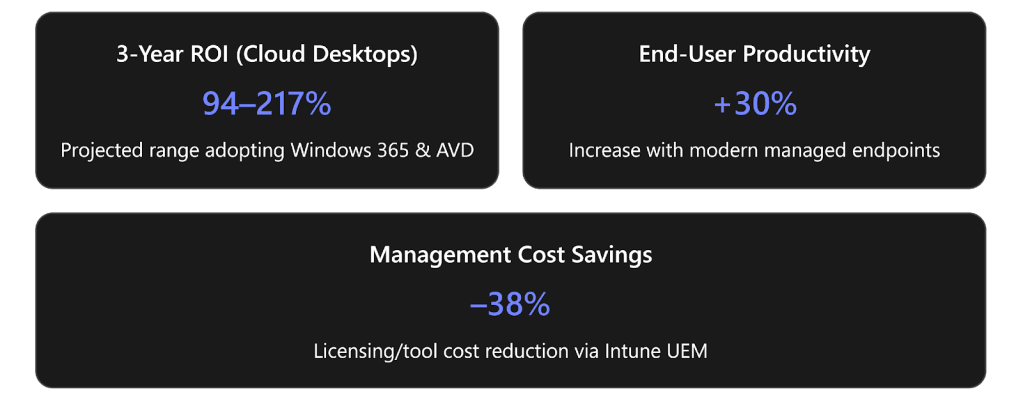
Why invest now? Aside from tech maturity, the business case is strong. According to the Forrester study, adopting cloud desktops (Windows 365 and AVD) yielded a projected ROI of 94% to 217% over three years for a mid-sized composite organisation. Productivity gains were significant, employees saved 6 –12 minutes per day thanks to fewer outages and faster logins compared to traditional PCs. It also cuts IT infrastructure costs (like running on-premises remote desktop servers) by hundreds of thousands of dollars. In short, cloud PCs can pay for themselves through improved uptime, longer device life, and reduced support burden.
Finally, these tools are proven in the field. For example, Japanese integrator Uniadex built a unified desktop platform using AVD and Windows 365 that improved operational efficiency and avoided hardware refresh costs for their customers. Even Microsoft partners report real benefits, Glueck & Kanja, a services firm, put Windows 365 at the center of its endpoint offerings and saw a ~20% increase in customer wins as a result (indicating strong demand and value recognition in the market). All this should give SME IT leaders confidence that investing in cloud-based endpoints is a strategic move to drive productivity and cost savings.
2. Invest in Unified Endpoint Management with Microsoft Intune Suite
Managing Endpoints has never been more complex PCs, mobiles, tablets, and now Cloud PCs, across office, home, and field locations. Unified Endpoint Management (UEM) is the answer, and Microsoft Intune (part of the Endpoint Manager family) is a leading platform to achieve it. For 2026, Microsoft has made Intune even more compelling for SMEs by bundling advanced Intune Suite features into the standard Microsoft 365 bundles (E3 and E5) at no extra cost. This means organisations using Microsoft 365 E3/E5 can now leverage premium endpoint management capabilities out-of-the-box. Here’s why doubling down on Intune is a smart investment:
- Single pane of glass for all devices: Intune allows you to manage all endpoints from one console, whether company-issued Windows laptops, users’ personal smartphones, Macs, or even specialised devices. This consolidation replaces a patchwork of tools (MDM for mobile, group policies for PCs, etc.) with one cloud-based solution. The benefit is twofold: lower licensing and admin costs (one platform instead of many) and consistent policies across your environment. In fact, a recent Forrester study found consolidating endpoint tools with Intune cut licensing costs by 38% over three years for a large organisation. While your SME may not save millions in absolute terms, avoiding multiple tool subscriptions (VPN clients, third-party remote support, mobile MDM, etc.) can easily save tens of thousands annually.
- Intune Suite – now included with E3/E5: In late 2025, Microsoft announced that capabilities from the Intune Suite add-on are being integrated into M365 plans. This means:
- For M365 E3 (or Enterprise Mobility + Security E3): You now get Remote Help (for attended remote assistance with audit logging), Intune Advanced Analytics (insights into device health and usage), Tunnel for Mobile App Management (per-app VPN for mobile), and management for specialty devices and firmware updates.
- For M365 E5: You gain Endpoint Privilege Management (just-in-time local admin elevation), Enterprise App Management (advanced app deployment with a curated app catalog), and Cloud PKI (cloud-based certificate management). These tools were previously premium add-ons; now they’re part of your existing license. SMEs with E3/E5 can immediately take advantage of enterprise-grade capabilities that improve support and security. For example, Remote Help allows your IT staff to remotely troubleshoot user devices with full visibility and user consent logs critical when supporting remote employees. And Endpoint Privilege Management lets users run certain approved tasks as admin without giving them full admin rights, reducing the risk from malware or human error. This helps implement Zero Trust principles (least privilege) in a practical way, even in a smaller organization without a huge IT security team.
- Stronger security posture: Modern endpoint management isn’t just about pushing configs; it’s a frontline security measure. Intune can enforce compliance (e.g. require PIN, encryption, up-to-date OS) and integrate with Microsoft Defender and Entra ID (Azure AD) for conditional access. The Intune Suite additions specifically target today’s threats: For instance, 79% of ransomware attacks now involve compromised remote management or RDP tools on endpoints, often due to over-privileged accounts or unmonitored devices. By using Intune’s controls like Endpoint Privilege Management and strict compliance policies, SMEs can reduce breach risk by ~15% according to analysis. Intune’s cloud-based analytics and monitoring also help spot issues early at Ignite, Microsoft even introduced AI “Security Copilot” agents within Intune that can recommend policy changes or detect anomalies in your endpoint environment. All of this means better protection of company data with far less manual effort.
- Improved IT efficiency and user experience: A unified approach translates directly to time saved. With Intune, routine tasks like deploying applications or updates can be automated and done remotely (no more desk visits). Intune’s new features for 2026 (e.g. centralised admin task lists, maintenance windows scheduling, and remote Windows full device recovery in case of non-booting PCs) significantly reduce the IT support burden and downtime. The Forrester TEI study reported that adopting Intune led to 29% higher productivity for IT teams (fewer firefights, fewer tickets) and even a 25% drop in helpdesk ticket volume related to device issues. End-users benefit too: devices are more reliable and standardised. Faster software deployments and 80% less device update downtime (thanks to features like Windows Autopatch and hotpatching) contributed to a measured 30% increase in end-user productivity in that study’s composite org. In real terms, users had far fewer disruptive updates or broken configurations, so they could work without tech interruptions. For an SME, having your employees spend more time working and less time waiting on IT translates directly to business output.
- ROI and cost justification: From a pure financial perspective, UEM with Intune is highly attractive. The Forrester Intune TEI (June 2024) study calculated a 181% ROI over three years for a large enterprise using Intune and the Suite. While that was a bigger org, the sources of ROI apply equally to SMBs: license consolidation (mentioned 38% savings), avoiding security incidents (they quantified $370K saved by preventing breaches), and IT time savings. Importantly, the payback period was quick – under 6 months in that analysis. In an SME context, this might mean that the efficiency gains (fewer external IT support calls, less overtime, no separate MDM costs) can outweigh the investment within the first year. And since Intune comes with Microsoft 365, many of these capabilities are essentially already paid for in your subscription it’s about fully utilising them. The added Intune Suite features in E3/E5 make the value proposition even better in 2026, essentially “freeing” budget that might have gone to third-party solutions for remote support, privileged access management, or certificate services.
In summary, investing in Intune and a robust UEM strategy will simplify operations, fortify security, and cut costs. Your IT team can do more with the tools you already have, and your workforce gets a more seamless, protected computing experience. As an IT decision-maker, making Intune the backbone of endpoint management in 2026 is a move that sets the stage for longer-term initiatives like Zero Trust and proactive IT operations (AIOps), without needing the large IT staff those once required. It’s an investment that pays dividends in both reduced risk and improved productivity.
3. Leverage AI and Next-Generation Endpoint Capabilities
The year 2026 is not just about doing the same endpoint management more efficiently it’s also about embracing new capabilities that can transform how users and IT interact with technology. Artificial intelligence, automation, and modern OS features are now directly augmenting endpoint computing. SMEs should ensure they invest in endpoints that are “AI-ready” and future-proof, so they don’t fall behind larger competitors. Here are key forward-looking aspects to consider:
- Windows 11 and integrated AI: By 2026, Windows 11 has become the standard OS for modern endpoints, bringing built-in AI features (like Windows Copilot) and enhanced security (TPM 2.0, virtualization-based security, etc.). If your organization still has a Windows 10 footprint, migrating to Windows 11 is a critical investment to unlock these improvements. For example, Windows 11’s integration of Microsoft 365 Copilot can help users draft emails, analyse data, or create content with natural language a boast to productivity but it requires compatible endpoints and Microsoft 365 services. Likewise, application performance and stability enhancements in Win11 reduced crashes and increased efficiency compared to legacy OS versions. Upgrading endpoints to the latest OS (and hardware where needed) ensures your users can take advantage of these tools. Consider that improving digital employee experience by 30% (as seen with modern managed devices) not only boosts output but also morale and retention. Modern endpoints with Windows 11 provide a better experience, from faster boot times to smarter features.
- AI-powered management and support: Microsoft is infusing AI into endpoint management, which SMEs can leverage to compensate for smaller IT teams. Ignite 2025 introduced Security Copilot “agents” in Intune that use AI to help IT admins with tasks like reviewing configuration changes, generating complex policies from plain language, or identifying stale devices that should be de-provisioned. These AI agents act as force-multipliers for IT, automating analysis and decisions that used to require hours of expert troubleshooting. We are at the dawn of this AI-assisted IT operations era by investing time in 2026 to pilot and adopt these features, your organisation can stay ahead of the curve. Even end-user support is being enhanced by AI: expect tools that can auto-resolve common device issues or virtual assistants that guide users through fixes. The bottom line is that AI will become a core part of endpoint management and user support, and SMEs should plan for it now by using platforms (like Windows 365 and Intune) where these AI capabilities are arriving first.
- Cloud PCs as AI compute platforms: As noted earlier, Windows 365 Cloud PCs aren’t just for human end-users anymore. Microsoft’s concept of “Windows 365 for Agents” means you could have automated agents or bots running on Cloud PCs to perform tasks 24/7 – for example, an AI bot that logs into a legacy ERP system via a Cloud PC to run reports or transfers data between systems. This opens new possibilities to streamline operations. While this might seem advanced for an SME, consider scenarios like after-hours support or monitoring tasks that could be handled by a Cloud PC agent instead of an employee. Early adopters of these technologies can significantly amplify their productivity without proportional headcount increases. Even if you’re not ready for AI agents, the “AI-enabled Cloud PC” is already here Windows 365 can provide cloud instances with certain AI acceleration features (for example, leveraging cloud GPU for AI tasks), meaning employees on any device can access powerful AI tools. Crucially, this avoids the need to invest in expensive new laptops or desktops with specialised hardware. Your team can experience the latest AI-driven features (like intelligent search, real-time transcription, image generation in design tasks, etc.) by accessing a well-provisioned Cloud PC. It’s a way of democratising access to AI and high-performance computing for a smaller business.
- Automation and self-service: Modern endpoint investments should also include automating routine processes. Windows Autopatch, for example, is a cloud service (available with Windows Enterprise E3/E5) that automates Windows and Office updates in waves, ensuring devices stay up to date without admins manually rolling out patches. New enhancements like Autopatch “Update Readiness” dashboards give real-time insight into which devices are ready for updates, and which might fail enabling proactive remediation before users are affected. By enrolling your eligible devices in Autopatch or similar services, you reduce the manual workload and get the latest security fixes applied promptly (which also ties back to security ROI). Likewise, Intune’s Endpoint analytics can automatically flag devices with performance issues or recommend optimisations (for instance, identifying an app that crashes often and suggesting a reinstall or update). By investing effort in these automation tools, IT can shift from firefighting to optimisation. For SMEs, that might mean a part-time IT admin can effectively manage a growing environment by letting the system take care of routine tasks.
- Endpoint hardware innovations: Keep an eye on new endpoint hardware tailored for cloud and hybrid work. Microsoft, for instance, launched Windows 365 Link, a dedicated Cloud PC device (priced around USD $349) that is essentially a mini terminal optimised for Windows 365. While not every SME will deploy these, they represent an emerging class of cost-effective, centrally managed endpoints. A Windows 365 Link device has no local data or apps (everything streams from the Cloud PC), which greatly reduces security risk and IT maintenance. It can be ideal for frontline workers or shared workstation scenarios where you might otherwise buy a full PC for light tasks. This kind of hardware investment can provide a secure, controlled computing environment at a fraction of the cost of traditional PCs (and with less hassle – they can be set up in minutes and managed through Intune just like any other endpoint). SMEs planning a tech refresh should consider if a portion of users could be served equally well with cloud-centric devices. The savings in device and management costs, plus energy efficiency, contribute to ROI. Similarly, modern Windows laptops with Pluton security chips, 5G connectivity, and longer battery life can significantly improve workforce productivity, it’s about matching the endpoint to the worker’s needs in a forward-looking way, rather than a one-size-for-all PC refresh.
In essence, staying ahead with endpoint innovation is an investment in agility. Large enterprises are moving fast on AI and cloud-managed everything, but SMEs actually have an advantage: you can often adopt new tech faster due to less legacy process holding you back. By investing in modern endpoints (cloud PCs, unified management, Windows 11, AI capabilities) in 2026, you position your business to punch above its weight. You’ll enable your people to be as productive as those in much larger organizations, and your IT to be as effective and secure, if not more.
To summarise the key areas, here’s a snapshot of the recommended endpoint investments, their benefits, and the expected ROI or impact they can deliver:
| Investment Area | Key Benefits | Expected ROI / Impact |
| Windows 365 Cloud PC | Personal Cloud PCs: full Windows desktops accessible anywhere, on any device Simplified IT: quick provisioning, no on-prem infrastructure needed for VDI Security by design: data stays in cloud, not on local devices Hardware savings: extend PC refresh cycles, enable BYOD with low risk | 94–217% 3-year ROI (combined Cloud PC/AVD adoption) Up to $1.2M savings on device costs over 3 years for ~2k users (via BYOPC). Users save ~10 min/day from reduced downtime (adds thousands of hours of productivity annually). |
| Azure Virtual Desktop (AVD) | Flexible VDI: scalable session-based desktops/apps, ideal for part-time or pooled use Consumption-based cost: pay for what you use, scale VMs up/down to meet demand Hybrid options: can run on Azure or on-prem (Arc), addressing data sovereignty or low-latency needs Integration: full integration with Azure services; new migration tools simplify moving to Cloud PCs when ready | High cost-efficiency for burst or shared scenarios (e.g. one AVD host can serve multiple users, maximising resource use).Seamless Cloud PC migration path ensures investment is future-proof. Case studies show improved continuity and avoid hardware refresh by using AVD in hybrid cloud deployments. |
| Microsoft Intune Suite (UEM) | Unified management of PCs, mobile & cloud endpoints from one platform Built-in security & compliance: enforce policies (encryption, updates, auth) and Zero Trust controls (e.g. conditional access) Advanced tools included: Remote Help for support, Endpoint Privilege Management, analytics, app catalogue, etc. now bundled with M365 E3/E5 Automation & insights: AI-powered policy recommendations, update orchestration, and endpoint analytics for proactive IT | 181% ROI over 3 years (large-org composite) driven by IT labor savings and avoiding other tool costs.~38% reduction in endpoint management licensing costs by consolidating tools. 30% boost in user productivity from better device experiences (80% faster setup, 80% less downtime) .Lower security incidents 15% fewer breach chances observed with strong UEM practices. |
Conclusion
For IT leaders in SMEs, 2026 is the year to solidify your modern endpoint foundation. The tech has matured from cloud PCs to unified management, and the economics are proven. By investing in these areas, you will equip your organisation with a more resilient, efficient, and future-ready endpoint environment. Productivity will rise, security risks will drop, and IT operations will run smoother. Moreover, you’ll be ready to capitalize on emerging trends like AI-driven automation without a major overhaul, because you’ve already laid the necessary groundwork.
In a business environment where agility and smart resource use determine competitiveness, modern endpoints provide a clear ROI. They enable enterprise-grade capabilities on an SME budget, levelling the playing field. As the Ignite 2025 revelations highlighted, the tools to transform endpoint management and user computing experience are available and often built into the platforms you may already own. The companies that act on these insights early will gain a significant advantage in productivity and cost-effectiveness.
By making these strategic endpoint investments now, CIOs and IT leaders can ensure that their workforce remains productive anywhere, their data stays secure everywhere, and their IT teams are empowered to focus on innovation rather than maintenance. In short, modern endpoints are not just an IT upgrade, they are a business enabler and a cornerstone of digital strategy for 2026 and beyond.
If you need guidance or support in maximising your Modern Endpoint investment for 2026, don’t hesitate to reach out to Advania UK. Our team is ready to help IT leaders and stakeholders navigate the latest technologies, optimise your endpoint strategy, and ensure your organization gets the most value from its investments. Connect with us today to take the next step toward a more resilient, productive, and future-ready IT environment.
 The Modern Endpoints Brief