
Designing a successful Cloud Endpoint deployment whether Windows 365 (W365) or Azure Virtual Desktop (AVD) starts with understanding what your users do, how they work, and what resources they need.
This article provides a practical approach to workload analysis, persona definition, persona-to-endpoint mapping, and ongoing optimisation, plus a cost comparison view to help you make informed decisions.
Why Workload & Persona Analysis Matters
- Over-provisioning wastes money; under-provisioning degrades user experience.
- Security gaps emerge when policies are misaligned with roles.
- Clear personas create a blueprint for sizing, images, and endpoint configuration.
Step 1: Understand Your Workloads
Workloads represent the applications, processes, and resource demands users place on their endpoints.
- Lightweight Productivity: Email, Office apps, web browsing
- Knowledge Workers: Office apps + collaboration tools (Teams, SharePoint)
- Power Users: Heavy Excel, multiple apps, data analysis
- Specialised: CAD/graphics, engineering, dev environments
Metrics to capture: CPU/RAM, storage, network bandwidth/latency, app dependencies.
Step 2: Define Device Personas
- Task Worker: Minimal compute, single or few apps
- Knowledge Worker: Balanced compute, collaboration tools
- Developer: High compute, custom toolchains, admin rights
- Graphics Designer: GPU-enabled workloads
Benefits: Simplifies design, enables policy-based management, improves cost predictability.
Step 3: Map Personas to Cloud Endpoint Options
| Persona | Workload Type | Recommended Endpoint | Specs (starting point) |
| Task Worker | Lightweight | Windows 365 Business or Windows 365 Frontline | 2 vCPU / 4 GB RAM / 64–128 GB |
| Knowledge Worker | Moderate | Windows 365 EnterpriseORAzure Virtual Desktop – Multi-session Host | 2 vCPU / 8 GB RAM / 128–256 GB4 vCPU / 16 RAM / 128-256 (Min 10 Users per Host) |
| Developer | Heavy compute | AVD Dedicated or Pooled (personal for specialised) | 4 vCPU / 16 GB RAM |
| Graphics Designer | GPU-intensive | AVD GPU-enabled host | 8 vCPU / 32 GB RAM + GPU |
Step 4: Design Considerations
- Image Strategy: Persona-based images, app packaging, and updates.
- Security & Compliance: Conditional Access, Defender, baseline policies per persona.
- Connectivity & Identity: Entra ID, hybrid join as needed; optimise sign-in and latency.
- User Experience: Validate with Endpoint Analytics (PCs) and AVD Insights (session hosts).
Step 5: Cost Optimisation Strategies
Windows 365:
- Choose the right SKU for each persona; avoid oversizing.
- Use Business vs Enterprise appropriately; Enterprise for Intune-led management.
- Monitor performance and resize where appropriate.
Azure Virtual Desktop:
- Autoscaling: Power management or dynamic autoscale for pooled host pools to cut idle time.
- Pooled vs Personal: Prefer pooled for task/knowledge workers; personal for specialised use.
- Reservations/Savings Plans: Reserve baseline compute and use autoscale for peaks.
- Right-size VM/storage: Tune vCPU/RAM, disk types, and profile storage (FSLogix).
Flowchart: Persona-to-Endpoint Mapping Workflow
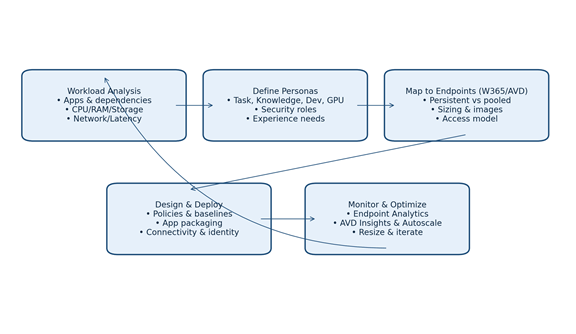
Figure: Workload → Personas → Endpoint Mapping → Design & Deploy → Monitor & Optimise (loop).
Cost Comparison: Windows 365 vs Azure Virtual Desktop (Illustrative)
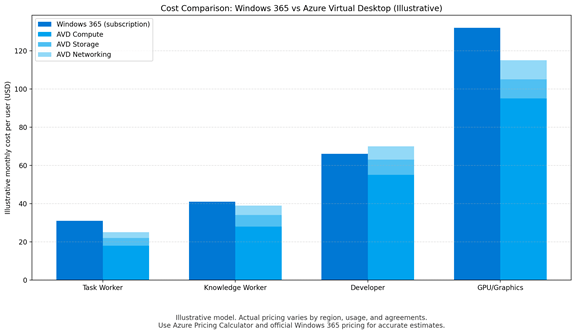
Figure: W365 fixed subscription vs AVD consumption components (compute, storage, networking).
How Advania Can Help
If you are uncertain whether W365 or AVD is the most suitable solution for your organization, Advania can assist by conducting a thorough analysis of your workloads through a Microsoft-funded workshop and proof of concept. We will carry out a discovery workshop to assess your user personas, deploy proof-of-concept desktops, monitor performance, and analyse data to provide well-informed recommendations tailored to your business needs.
Please contact us for further information.
References (pricing & optimisation)
Windows 365 plans & pricing (Business/Enterprise); persona sizing examples (Microsoft Learn).
Azure Virtual Desktop pricing overview; licensing (eligible Microsoft 365/Windows or per-user access).
Autoscale guidance and AVD Insights (Microsoft Learn; Microsoft Mechanics).
Note: Cost figures shown are illustrative. Use the Azure Pricing Calculator and official Windows 365 pricing to model your environment by region, usage, and agreements.
 The Modern Endpoints Brief