
Enabling Windows Hello for Business at Tenant Level
Overview
Windows Hello for Business (WHfB) is Microsoft’s Passwordless sign-in solution for enterprise environments. It replaces passwords with strong, phishing-resistant credentials that are bound to the user and protected by a device’s Trusted Platform Module (TPM).
Windows Hello for Business is a foundational control in the Microsoft Zero Trust security model. When enabled at tenant level and deployed correctly, it significantly reduces identity-related attack risk while improving the end-user sign-in experience.
This article describes:
- Why Windows Hello for Business is central to Zero Trust?
- How to enable WHfB at tenant level using Microsoft Intune?
- Recommended deployment patterns for dedicated devices
- Supported and scalable patterns for shared devices
Why Windows Hello for Business is critical for Zero Trust
Microsoft Zero Trust is built on three core principles:
- Verify explicitly
- Use least privilege
- Assume breach
Windows Hello for Business directly supports all three principles.
How Windows Hello for Business works
When a user enrolls in Windows Hello for Business:
- An asymmetric key pair is generated
- The private key is stored securely in the device TPM
- The user unlocks the key using a local gesture (PIN or biometric)
The PIN or biometric gesture:
- Never leaves the device
- Is never transmitted over the network
- ·Cannot be replayed or phished
This design makes Windows Hello for Business inherently phishing-resistant and resilient against credential replay attacks.
Zero Trust outcomes delivered by WHfB
Windows Hello for Business enables the following Zero Trust outcomes:
- Strong binding between user identity, device identity, and authentication
- Native integration with Microsoft Entra ID Conditional Access
- Passwordless sign-in without compromising security or usability
Important
A mature Microsoft Zero Trust architecture cannot be achieved without Windows Hello for Business or another phishing-resistant authentication method.
Enable Windows Hello for Business at tenant level
Microsoft recommends enabling Windows Hello for Business centrally and managing it using cloud-based controls rather than legacy Group Policy–only approaches.
Recommended configuration method
The supported and recommended configuration path is:
Microsoft Intune:
- Endpoint security
- Account protection
- Windows Hello for Business
The Account protection policy replaces the older Identity Protection profile, which is deprecated. Account protection policies provide:
- Clearer policy precedence
- Improved reporting and troubleshooting
- Better alignment with Conditional Access and Zero Trust controls
Tenant-wide capability vs scoped enforcement
Although Windows Hello for Business can be enabled tenant-wide during device enrolment, Microsoft does not recommend enforcing it blindly across all users and devices.
Use the following approach instead:
- Enable Windows Hello for Business tenant-wide as a capability
- Use scoped assignments in Intune to control where WHfB is:
- Required
- Optional
- Excluded
This approach avoids deployment issues and sign-in friction for scenarios such as kiosks, shared devices, and break-glass accounts.
Deploy Windows Hello for Business on dedicated devices
Deploy Windows Hello for Business on dedicated devices
Dedicated devices are assigned to a single primary user and provide the best experience for Windows Hello for Business.
Recommended device configuration
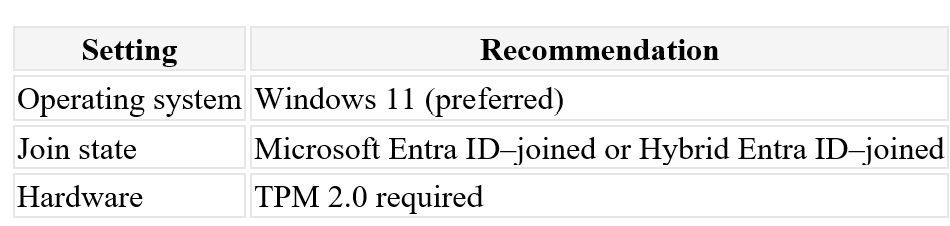
Authentication model
- Cloud Kerberos Trust (recommended for both cloud-only and hybrid environments)
- Windows Hello gesture: PIN + biometric where hardware supports it
Policy recommendations
- Require Windows Hello for Business enrolment
- Set minimum PIN length to 6–8 digits
- Do not enforce PIN rotation (NIST-aligned)
- Enable biometric anti-spoofing where supported
This model enables fast sign-in, strong phishing resistance, and seamless single sign-on to both cloud and on-premises resources.
Deploy Windows Hello for Business on shared devices
Shared devices require additional design considerations. Most deployment failures occur when shared device behavior is not accounted for during planning.
Key design constraint
Windows Hello for Business credentials are:
- Per user
- Per device
- Non-roaming
Each user must enrol Windows Hello for Business separately on every shared device they use. This behaviour is by design because credentials are protected by the device TPM.
Recommended pattern for shared devices
Use Shared PC mode
Always configure shared devices using Windows Shared PC mode, managed through Microsoft Intune.
Shared PC mode:
- Is the supported configuration for multi-user devices
- Automatically manages profile growth
- Cleans up inactive user profiles
- Prevents TPM and biometric exhaustion over time
Prefer PIN-first authentication
For shared devices:
- Use PIN-first authentication
- Enable biometrics only when necessary
Biometric enrolment has a limited capacity per device. High-churn environments (hot desks, frontline workers, education) can quickly exceed this limit and cause enrolment failures.
Scope WHfB carefully
For shared device scenarios:
- Make Windows Hello for Business optional
- Exclude kiosk and break-glass accounts
- Avoid tenant-wide mandatory enforcement
This approach improves reliability and user experience without weakening security controls.
Use FIDO2 security keys as a companion method
FIDO2 security keys are highly recommended for shared device environments.
FIDO2 keys:
- Are roaming (no per-device enrolment)
- Are phishing-resistant
- Integrate natively with Microsoft Entra ID
- Work well for shared and frontline scenarios
- Many organizations implement:
- Windows Hello for Business on dedicated devices
- FIDO2 security keys as a primary or fallback method on shared devices
Reference architecture
A scalable and supportable deployment pattern includes:
- Tenant-wide Windows Hello for Business enabled
- Intune Account Protection policies
- Dedicated devices: Windows Hello for Business required
- Shared devices: Shared PC mode + PIN-first WHfB + FIDO2
- Cloud Kerberos Trust for hybrid environments
- Aggressive user profile clean-up
This architecture aligns with Microsoft Zero Trust guidance while remaining operationally sustainable.
Summary
Windows Hello for Business is not a convenience feature, it is a core Zero Trust control in the Microsoft identity platform.
When deployed at tenant level with appropriate scoping and device-specific design:
- Credential-based attack risk is significantly reduced
- Passwords are eliminated from daily sign-in
- User experience improves rather than degrades
- Successful deployments are built around device ownership models:
- Dedicated devices benefit from full Windows Hello for Business enforcement
- Shared devices require Shared PC mode, careful scoping, and often FIDO2 supplementation
When implemented correctly, Windows Hello for Business becomes a strategic security enabler rather than an operational challenge.
Next steps
- Review your tenant’s Windows Hello for Business configuration in Intune
- Pilot deployment using scoped assignments
- Validate shared device scenarios early
- Consider FIDO2 security keys for frontline or high-churn environments
 The Modern Endpoints Brief